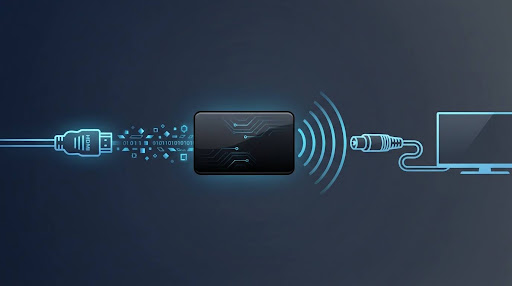
HDMI modulation is the process of converting a digital HDMI audio/video signal into a radio-frequency (RF) signal that can travel over an ordinary coaxial cable and be picked up by a television the same way it picks up a regular broadcast channel.
In plain terms: it takes the signal coming out of a modern device — a streaming box, a laptop, a security camera system, a game console — and repackages it so a TV with only a coax or antenna input, and no HDMI port, can display it.
The device that does this job is usually called an HDMI RF modulator or, more precisely, an encoder-modulator, since most units also compress and encode the video before converting it to RFbecause a typical device acquires a baseband HDMI signal, compresses it into a broadcast codec, packetizes it into a transport stream, and then modulates that stream onto an RF carrier matching the standard the destination TVs expect.
How HDMI Modulation Actually Works
Break it down into three stages and it stops feeling technical.
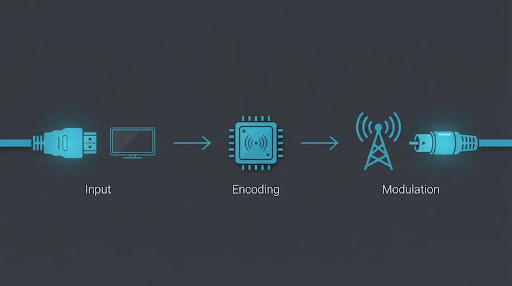
- Input. The modulator receives a digital HDMI signal from a source — a media player, DVD/Blu-ray player, streaming box, PC, or camera.
- Encoding. The video and audio are compressed into a broadcast-friendly format, commonly H.264 or H.265, and organized into a structured data stream so a TV tuner can recognize it as a “channel.”
- Modulation. That encoded stream is used to modulate — essentially, imprint — an RF carrier wave at a specific frequency. The result is a signal that behaves exactly like a normal over-the-air or cable TV channel once it hits the coax network.
Once modulated, the signal travels over standard coaxial cable and can reach any TV connected to that same coax line, all tuned to the correct channel number — no HDMI cable required at the receiving end.
This is also why “modulation” and “an RF modulator” get used almost interchangeably. Modulation is the technical process; the modulator is the box that performs it.
What Is an HDMI RF Modulator?
An HDMI RF modulator is the physical hardware that performs HDMI modulation. It sits between an HDMI source and a coaxial TV network, and its whole job is signal conversion — not creating new content, just changing the format the content is delivered in.
Typical real-world uses:
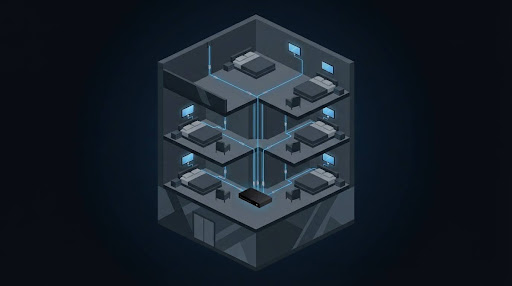
- Hotels and hospitals distributing a single video source (welcome channel, in-house information, digital signage) to many rooms over existing coax wiring, without running HDMI cable to every TV.
- Older or multi-TV homes where a newer streaming device needs to reach a TV that predates HDMI, or where someone wants one source feeding several TVs through existing coax without a full smart-TV upgrade on each set.
- Apartment buildings and gyms centralizing one video feed across a shared coax distribution system.
- Retro gaming and legacy-device setups where a modern HDMI-only device (like a capture card or streaming stick) needs to output to a CRT or coax-only television.
HDMI to RF vs RF to HDMI — Don’t Mix These Up
This is where a lot of buyers get tripped up, and it’s the most important distinction on this
Page.
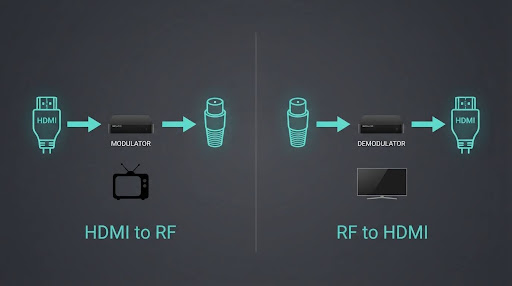
| HDMI to RF (HDMI RF Modulator) | RF to HDMI (RF-to-HDMI Converter) | |
| What goes in | HDMI signal | Antenna/cable coax (RF) signal |
| What comes out | RF signal over coax | HDMI signal |
| Typical use case | Feeding a modern source to an old TV that lacks HDMI | Feeding an old antenna, cable box, or VCR signal into a modern TV or monitor that lacks a coax/RF tuner |
| Who needs it | Someone with a new device and an old TV | Someone with an old signal source and a new TV or monitor |
If your search led you to “rf to hdmi converter,” you likely have the opposite problem from what an HDMI modulator solves: you have an old coax-only signal (antenna, cable box, or an old device with only an RF output) and a newer television or monitor that only accepts HDMI. That calls for an RF-to-HDMI converter, which does the exact reverse conversion described above. Buying the wrong one of these two devices is the single most common mistake in this category, so it’s worth double-checking your actual signal direction before ordering anything.
Types of HDMI RF Modulators
Not all HDMI RF modulators are built for the same job.
Consumer/single-channel modulators are small, inexpensive boxes designed for one HDMI input feeding one RF output channel — typically enough for a home setup with a handful of TVs sharing one coax run.
Professional/headend-grade encoder-modulators are rack-mounted systems built for scalecombining real-time compression, MPEG transport stream packetization, program signaling, and RF modulation, and ranging from compact single-program units to higher-density multi-input chassis systems. These are what hotels, hospitals, and large commercial properties actually deploy, since they need to inject multiple channels into a shared coax plant reliably.
The practical difference for a buyer: a consumer unit is plug-and-play for a small personal setup; a professional unit is a planned infrastructure purchase, usually specified by an AV integrator.
The Broadcast Standards Involved (Kept Simple)
An HDMI RF modulator has to output a signal in a format the receiving TV’s tuner actually understands. That format depends on region and TV age:
- ATSC — the digital broadcast standard used in the US and some other countries.
- DVB-T (terrestrial) and DVB-C (cable, closely related to QAM) — common across much of Europe, Asia, and other regions using the DVB family of standards.
- PAL — the older analogue colour standard historically used across most of Europe, Africa, and Asia, including Pakistan, before digital broadcasting became widespread.
Pakistan’s telecom landscape is shifting fast on the digital side too — see our coverage of 5G in Pakistan for how newer network rollout compares to this older coax infrastructure.
You don’t need to become an RF engineer to use one of these devices, but it’s worth knowing that a modulator built for one standard won’t necessarily be usable, out of the box, in a market expecting another — this is why some buyers end up with a device whose “channel 3/4” output doesn’t tune in properly on a newer digital TV.
Setting Up an HDMI RF Modulator: The Basic Steps
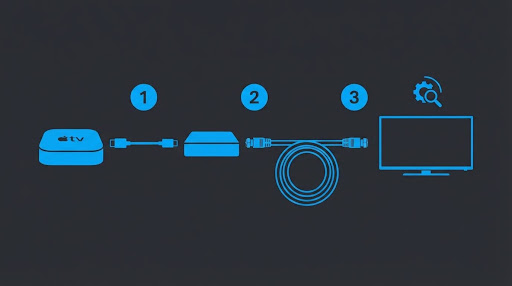
- Connect the HDMI source (streaming box, player, camera, PC) to the modulator’s HDMI input.
- Connect the modulator’s RF/coax output to the coaxial network feeding the destination TV(s) — either directly or through existing in-wall coax wiring.
- Set the output channel or frequency on the modulator, using its on-device controls or configuration app, matching a channel that’s free of interference on the destination TVs.
- Scan for channels on the destination TV(s) the same way you would for any new cable or antenna channel.
- Fine-tune signal strength if the picture is unstable, especially over longer coax runs or through multiple splitters.
Common Problems and Fixes
- No picture after channel scan: Confirm the modulator’s output standard (ATSC/DVB-T/DVB-C/PAL) actually matches what the destination TV’s tuner expects.
- Pixelation or dropouts: Usually signal degradation from cable length, too many splitters, or a weak output level — reducing splitter count or adding an amplifier often resolves this.
- Audio out of sync: Often an encoding/buffering issue on lower-end consumer units; firmware updates from the manufacturer sometimes address this.
- Works on one TV but not another on the same line: Check for a tuner mismatch (analogue-only tuner vs digital tuner) rather than assuming a wiring fault.
Do You Need One in 2026?
Fewer people need this than a decade ago, and it’s worth saying plainly: if every TV in your setup already has an HDMI port, you likely don’t need an HDMI RF modulator at all — a direct HDMI connection, an HDMI splitter, or a wireless HDMI extender will usually be simpler and give a cleaner picture with no compression loss.
Where it still earns its place:
- Distributing one source to many TVs over existing coax wiring, where running individual HDMI cables to every set isn’t practical (hotels, gyms, shared buildings).
- Feeding an HDMI source into a genuinely old TV that has no HDMI input at all.
- Commercial or institutional installs where a coax plant is already in place and rewiring it for HDMI isn’t in the budget.
For a single modern TV with a spare HDMI port, this is almost always more hardware than the job requires.
FAQs
Is HDMI modulation the same as HDMI conversion?
Not quite. “Conversion” usually refers to changing HDMI to another digital format (like HDMI to DisplayPort). Modulation specifically means converting to an RF/coax signal.
Will an HDMI RF modulator work with a 4K source?
It depends on the specific unit’s input support and how it encodes the signal. Many consumer modulators accept a 4K HDMI input but downscale or re-encode the output, since RF/coax bandwidth is far more limited than direct HDMI. Check the specific product’s documented input and output resolution before buying — this varies by model and isn’t something to assume.
Can I use one modulator to feed multiple TVs?
Yes, as long as those TVs share the same coaxial distribution network and are tuned to the modulator’s output channel. Splitters can extend this to more TVs, though signal strength drops as you add more splits.
What’s the difference between an RF modulator and an HDMI splitter?
A splitter duplicates an HDMI signal to multiple HDMI outputs, keeping it digital and uncompressed. A modulator converts the signal to RF for coax distribution. They solve different distribution problems.
Do I need a professional installer to set one up?
For a small home setup with a single consumer-grade unit, no — it’s largely plug-and-play. For a building-wide or hotel-style headend deployment, professional AV/RF planning is standard practice.
Is this legal to use at home?
Distributing a signal internally over your own coaxial wiring for personal or in-building use is standard practice and how these devices are commonly sold and used. If you have specific concerns about local telecom regulations in your country, it’s worth checking with the relevant regulator, since this article isn’t a substitute for legal advice.
Why do some listings call this an “RF modulator for TV” instead of an “HDMI modulator”?
They’re generally describing the same category of device. “RF modulator for TV” is a broader, more generic search term, while “HDMI RF modulator” specifies the input type. Some very old RF modulators accepted composite/analogue video only, not HDMI — so if you’re shopping by that broader term, confirm the specific unit actually has an HDMI input.
What if I actually need to go the other direction — old signal into a new TV?
That’s a different device: an RF-to-HDMI converter, covered above. Make sure you’re buying the one that matches your actual signal direction.